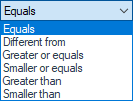
If one or more documents exist at the specified location
The document under test is a part, assembly or drawing. 
This operation is performed if one or more documents exist at the specified location— "Location to be tested. "
In fact, this field can contain:
- Given a filename and its directory, check whether the file exists at the specified location.
- Either use system variables to specify the location:
- Variables related to the user profile (UserProfile, AppData, Desktop, etc.)
- System-related variables (ProgramData, CommonProgramFiles, etc.)
- Document-related variables (Directory, Name, PathName, etc.)
- In addition, you can use certain characters to define a pattern (filter for filenames): * and ?
For example:
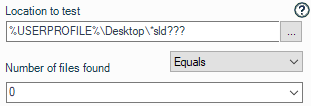
- *.sld??? will support all SOLIDWORKS file types
- *.sldprt will process all SOLIDWORKS part files
- 080*.sld??? will include all types of SOLIDWORKS documents whose names begin with 080
Example: We want to verify that there are no SOLIDWORKS files (Part, Assembly, or Drawing) saved on the desktop.
 →