
Filters
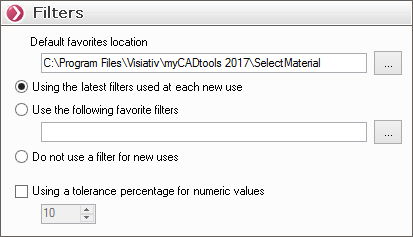
- " Default location for favorites ":
If you wish to use filter favourites, you can specify  a folder for saving and opening favorites. This folder can be a directory on the network to be available to multiple users.
- " Use the most recently used filters each time the application is launched ":
Each time the SelectMaterial utility is launched, the most recently used filters will be automatically selected.
- " Use the following filter preset ":

Each time the SelectMaterial utility is launched, the filter selected will be used systematically.
- " Do not use a filter for new uses ":
Each time the SelectMaterial utility is launched, the filters will be reset, regardless of the selections made during the previous launch.
- " Use a tolerance percentage for numerical values ":
When a filter is set to a numerical value, you can view the results for available materials that meet a certain percentage of that value.
For example, to search for materials, filter by a Poisson's ratio of 0.3; if the percentage is set to 10%, the results will include materials with a Poisson's ratio between 0.27 and 0.33.