
Adding a Request
Entering Database Queries

- Add SQL queries by pressing the icon
 and select the variable.
- Modify a query
 after selecting it.
- Delete a query
 after selecting it.
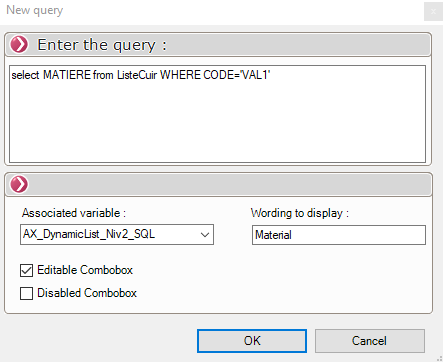
This query will use keywords to take into account the values selected from the drop-down lists: VALn for the value in drop-down list number n.
The SQL query supported by the tool is of the following type:
SELECT <ATTRIBUTE> FROM <TABLE> WHERE <CONDITION>
For each variable, you can enter a label. This label will appear in the data card; if no label is provided, the variable's name will be displayed.
For example:
Case with 2 drop-down lists displaying families and subfamilies.
- Query for families: SELECT FAMILY FROM FAMILY_TABLE
- Query for subfamilies: SELECT SUBFAMILY FROM FAMILY_TABLE WHERE FAMILY='VAL1'
Case with 4 lists.
- SELECT DISTINCT FAMILY FROM FAMILY_TABLE
- SELECT DISTINCT SUB_FAMILY FROM FAMILY_TABLE WHERE FAMILY='VAL1'
- SELECT DISTINCT SUB_FAMILY_2 FROM FAMILY_TABLE WHERE FAMILY = 'VAL1' AND SUB_FAMILY = 'VAL2'
- SELECT DISTINCT SUB_FAMILY_3 FROM FAMILY_TABLE WHERE FAMILY='VAL1' AND SUB_FAMILY='VAL2' AND SUB_FAMILY_2='VAL3'
The variables VAL1, VAL2, ... correspond to drop-down menus 1, 2, ...