
Creation of a button to increment the counter

A button can be added to the data card to force a new counter value.
For example, in this case, the counter named SerialNumber will take on a new number and the concatenation of variables will be recalculated.
The counter value is always the same for all configurations.
Add button to map :
- Add a button to the map and choose the command type Execute complement.
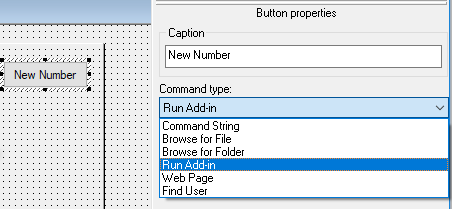
- Enter the following syntax in the complement name: SerialNumber.Increment.SerialNumber name myPDMtools
It is possible to use the wildcard character * for cases beginning with text*contains *text* or ended with *text or just * to increment all SerialNumbers.
- You can also process only the active configuration by adding the syntax : ActiveConfigOnly
In our example, the name of the complement will be in this form :

If a counter is used in the SerialNumber value, the Save counter value is mandatory.
