
Creation of a button to recalculate concatenation

A button can be added to the data card to recalculate the value of the SerialNumber.
You don't need to add this button if you use the : 
Add button to map :
- Add a button to the map and choose the command type Execute complement
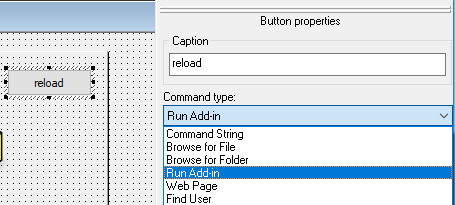
- Enter the following syntax in the complement name: SerialNumber.Update.SerialNumber name myPDMtools
It is possible to use the wildcard character * for cases starting with text*contains *text* or ended with *text or just * to update all SerialNumbers.
In our example, the name of the complement will be in this form :

If a counter is used in the SerialNumber value, the Save counter value is mandatory.
