
General
The General tab contains the fundamental SmartDrawings parameters that define file location, naming conventions and tool behavior during drawing generation.
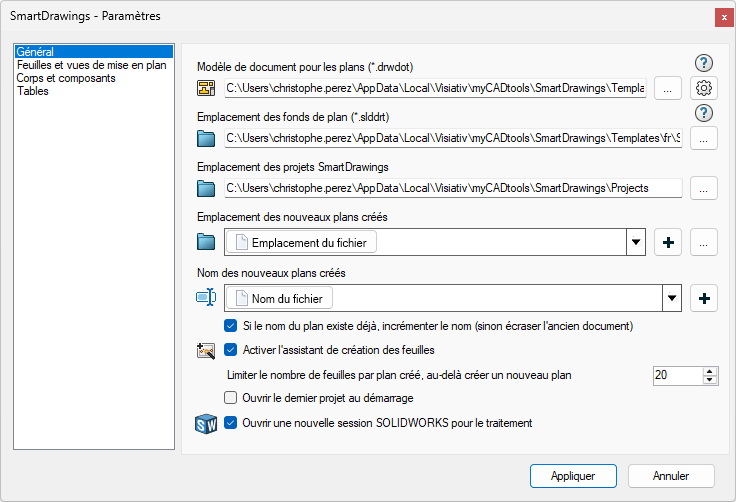
Document template for plans (*.drwdot)
Select the document template you want to use by default
Location of background maps (*.slddrt)
Select the location of your custom backgrounds
Location of SmartDrawings projects
Location for storing and searching SmartDrawings projects
Location of newly created plans / Name of newly created plans
Define the default location and naming of new plans with field generation tool.
If plan name already exists, increment name (otherwise overwrite old document)
If checked, this option allows you to create a new file by incrementing the name. If unchecked, the old file will be overwritten by the new one.
Activate the sheet creation wizard
Check this option to have the wizard for sheet creation.
If this option is unchecked, the window will not appear when a new sheet is created.
Limit the number of sheets per plan created, beyond which a new plan must be created.
This option lets you automatically create a new plan when the current one exceeds a certain number of sheets.
It is useful when generating on a part with many bodies or an assembly with many components.
Open a new SOLIDWORKS session for processing
Enabling this option will consume more resources as it will open a second SOLIDWORKS for processing.