
Options
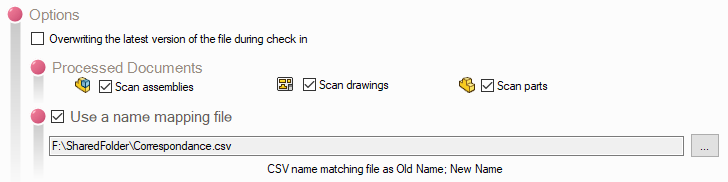
The following options are available:
- Replace existing files with a specific version:
When files are archived, the previous version will be replaced.
- Retrieve the versions of documents referenced locally during processing:
Allows you to save the "as-built" versions of referenced documents locally when you correct references in an assembly. This allows you to retain the referenced versions when archiving and avoid pointing to the latest versions.
- Documents processed:
In this window, you specify the documents to be included in the analysis. By default, all options are checked, and it is recommended that you leave them that way, since you may not necessarily know whether references point to different types of files.
- Use a name mapping file:
This option allows you to search for and replace the name in SOLIDWORKS file references based on a file.
The CSV file containing the name mappings must be in the format Old name;New name, with or without a file extension.