
Condition groups in the ''Or'' folder
You can nest conditions within the " Or " folder to create groups of conditions. In fact, any condition added to a condition already present in the " Or " folder will be treated as an " And " condition.
Examples:

- "If a property exists": "Item_Code" (drag this condition into the "Or" folder).
- "If the number of characters in the value is equal to " "4" (Drag this condition into the " Or" folder next to the first condition).

- "If a property exists": "Finish" (drag this condition into the " Or" folder).
- "If the number of characters in the value" is equal to "3" (Drag this condition into the " Or" folder next to the second condition).
Which gives:
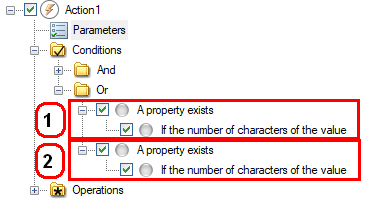
If the property ''Item_Code'' exists and that its value is equal to 4 characters.
Or
If the property ''Finish'' exists and that its value is equal to 3 characters.
Then the operation will be performed.