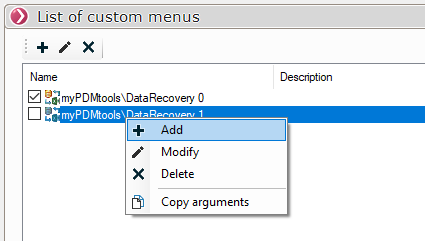
List of Custom Menus
You can define multiple lists of custom menus.
By the icons  or by right-clicking in the window
- Select a custom menu then click on this icon
 to edit a menu.
- Select a custom menu then click on this icon
 to delete a menu.
- Click on this icon
 to add or create a custom menu.
Once you've created a custom menu, you can right-click the menu to copy its specific arguments and run the process via a Windows task. This allows you to run the process without using the drop-down menu (checkbox unchecked).
You can use the DataRecovery file located in the installation folder to run the process using the Windows Task Scheduler